
Running a busy pub, restaurant, or café in the UK demands seamless operations, but many hospitality venues struggle with outdated or inefficient point of sale systems that cost them revenue and frustrate customers. When your POS crashes during peak service, fails to track orders accurately, or confuses staff with complex interfaces, you lose money and damage your reputation. This guide reveals proven strategies to optimise your hospitality POS system in 2026, helping you boost operational efficiency, enhance guest satisfaction, and increase profitability through smarter technology choices and implementation practices.
Table of Contents
- Identifying The Problem: Common Pain Points In Hospitality Pos
- Preparing Your Business: Key Requirements For Effective Pos Optimisation
- Executing Optimisation: Selecting And Implementing The Right Pos System
- Verifying Results And Continuous Improvement Of Your Hospitality Pos
- Explore Ycr’s Hospitality Pos Solutions For 2026
Key takeaways
| Point | Details |
|---|---|
| Revenue impact | Effective POS optimisation can boost revenue by up to 15% and speed service by 40% |
| System selection | Choosing the right system depends on venue type, operational needs, and UK compliance requirements |
| Training matters | Staff training and ongoing support are essential to maximise POS benefits and avoid costly errors |
| Cloud vs local | Cloud systems offer flexibility whilst local POS provides better offline reliability for different venues |
| Advanced features | Offline mode, loyalty integration, and real-time tracking enhance reliability and guest experience significantly |
Identifying the problem: common pain points in hospitality POS
Before you can fix your POS challenges, you need to understand exactly where current systems fail hospitality businesses across the UK. Many venues experience network outages, peak hour reliability issues, and food waste that directly impact profitability and service quality. These problems compound during busy periods when you can least afford disruption.
The most damaging issues include:
- System crashes during Friday and Saturday evening rushes leave staff unable to process orders or payments
- Complex order modifiers for dietary requirements and customisations slow service and increase errors
- Payment splitting for large groups creates bottlenecks at the till
- Hidden monthly fees and restrictive contracts trap businesses in unsuitable systems
- Poor inventory tracking leads to over-ordering and significant food waste
Staff frustration with unintuitive interfaces creates another layer of problems. When your team struggles to navigate basic functions, training new employees becomes expensive and time-consuming. Service speed suffers as workers hunt through menus to find items or correct mistakes. Customer satisfaction plummets when guests wait longer than necessary or receive incorrect orders.
“The right POS system should feel invisible to staff, allowing them to focus entirely on guest service rather than fighting with technology.”
Real-time tracking failures represent a hidden cost many hospitality managers overlook. Without accurate data on what sells and when, you cannot optimise purchasing decisions or adjust menus based on demand patterns. This disconnect between sales and inventory management directly contributes to waste, with some venues discarding thousands of pounds worth of food annually. Understanding these pain points helps you optimise hospitality POS efficiency by addressing root causes rather than symptoms.
Preparing your business: key requirements for effective POS optimisation
Successful POS optimisation starts long before you install new hardware or software. Your preparation phase determines whether implementation delivers genuine improvements or creates new headaches. Begin by honestly assessing your venue type and operational complexity, as a busy city centre restaurant requires vastly different functionality than a village pub.
Venue type dictates essential features:
- Counter service venues need fast order entry and payment processing above all else
- Table service restaurants require robust table management, course timing, and kitchen communication
- Hybrid operations demand flexible switching between service styles throughout the day
Understanding UK VAT and compliance requirements prevents costly mistakes down the line. Your POS must accurately calculate and report VAT on all transactions, handle split payments correctly, and maintain audit trails that satisfy HMRC requirements. Systems lacking proper compliance features expose you to penalties and create accounting nightmares.
Feature planning ensures your optimised system handles real-world scenarios. Offline mode becomes critical when internet connectivity fails during service. Multi-payment support accommodates guests who want to split bills or use different payment methods. Integration with existing kitchen display systems, booking platforms, and accounting software eliminates manual data entry and reduces errors.
Pro Tip: Create a weighted feature list ranking must-haves versus nice-to-haves based on your specific operational pain points, then use this to evaluate potential systems objectively rather than being swayed by impressive but irrelevant features.
Vendor evaluation protects you from common traps. Scrutinise contracts for hidden fees, automatic renewal clauses, and restrictive terms that lock you into unsuitable arrangements. Request transparent pricing that includes all hardware, software licences, support costs, and payment processing fees. Ask about ownership of your data and export capabilities should you need to switch providers.
| Preparation element | Key considerations | Common mistakes to avoid |
|---|---|---|
| Venue assessment | Service style, covers per day, peak times | Choosing systems designed for different venue types |
| Compliance check | VAT reporting, audit trails, HMRC requirements | Overlooking regulatory features until audit time |
| Feature mapping | Offline capability, payment options, integrations | Prioritising flashy features over operational needs |
| Staff input | Interface usability, training requirements | Selecting systems without consulting end users |
Technology compatibility checking prevents integration failures that plague many implementations. Audit your existing hardware including card readers, receipt printers, kitchen printers, and customer displays to determine what remains usable. Verify network infrastructure can handle increased data traffic, particularly for cloud-based systems. Plan for adequate backup power to maintain operations during outages.
Staff training planning must be integral to your optimisation strategy rather than an afterthought. Budget time and resources for comprehensive initial training plus ongoing refreshers. Identify internal champions who grasp new technology quickly and can support colleagues. Consider how training fits around service schedules without compromising guest experience. Hospitality POS optimisation succeeds or fails based on how well your team adapts to new workflows.
Executing optimisation: selecting and implementing the right POS system
With preparation complete, you can confidently select and deploy a POS system that transforms your hospitality operations. The execution phase requires methodical evaluation, testing, and phased implementation to minimise disruption whilst maximising benefits. Your venue’s specific needs should drive every decision rather than vendor recommendations or industry trends.
Step 1: Evaluate cloud versus local POS architecture for your situation. Cloud POS offers flexibility and scalability but depends entirely on reliable internet connectivity. Local systems provide better offline reliability and often lower long-term costs but require more upfront investment. Consider your internet stability, budget constraints, and growth plans when choosing.
| Feature | Cloud POS | Local POS |
|---|---|---|
| Initial cost | Lower hardware investment | Higher upfront hardware cost |
| Monthly fees | Ongoing subscription required | Minimal after purchase |
| Scalability | Easy to add locations | Requires additional hardware |
| Offline capability | Limited or none | Full functionality |
| Updates | Automatic and frequent | Manual or scheduled |
| Data access | Anywhere with internet | On-premises only |
Step 2: List and prioritise essential features that address your specific pain points. Offline mode ensures continuous operation during internet outages. Multi-payment support handles contactless, chip and PIN, mobile wallets, and split payments seamlessly. VAT compliance automates tax calculations and reporting. Real-time inventory tracking prevents stockouts and reduces waste. Kitchen display integration eliminates paper tickets and improves order accuracy.
Step 3: Conduct realistic peak-hour simulations before committing to any system. Set up a test environment that mirrors your actual service conditions, then have staff process typical orders whilst you monitor speed, error rates, and usability. Push the system hard with complex modifications, split payments, and rapid order entry to expose weaknesses. This testing phase reveals problems vendors never mention in sales presentations.
Step 4: Plan phased deployment that minimises risk and disruption. Start with a single terminal or service area, allowing staff to learn gradually whilst maintaining backup systems. Gather feedback and address issues before expanding rollout. Schedule intensive training during quieter periods when staff can focus without service pressure. Build in extra support during the first weeks of full deployment.
Pro Tip: Run parallel systems for at least one full week during transition, processing every transaction through both old and new POS to verify accuracy and identify workflow issues before fully committing to the new system.
Choosing between POS solutions examples requires balancing immediate needs against future growth. A system perfect for your current single location might not scale when you open a second venue. Conversely, enterprise-level features add complexity and cost you may never need. Focus on systems designed specifically for UK hospitality rather than generic retail POS adapted for restaurants.
Implementation success depends on clear communication with your team throughout the process. Explain why you are changing systems, how it benefits them directly, and what support they can expect. Address concerns openly and adjust timelines if staff need more training time. Create quick reference guides for common tasks and keep them accessible at every terminal. Celebrate small wins as staff master new workflows and service speeds improve.
Verifying results and continuous improvement of your hospitality POS
Optimisation does not end when your new POS goes live. Measuring impact, gathering feedback, and maintaining improvements ensures you realise the full value of your investment whilst identifying opportunities for further enhancement. Systematic verification reveals whether your optimisation delivers promised benefits or requires adjustment.
Measure concrete outcomes against your baseline performance. Track revenue growth by comparing like-for-like periods before and after implementation. Monitor service speed improvements by timing order-to-payment cycles during peak hours. Count positive review mentions of fast service or accurate orders to gauge guest satisfaction changes. Derby Manor hotel achieved 15% revenue increase and 40% faster service after implementing optimised POS systems, demonstrating the substantial impact possible.
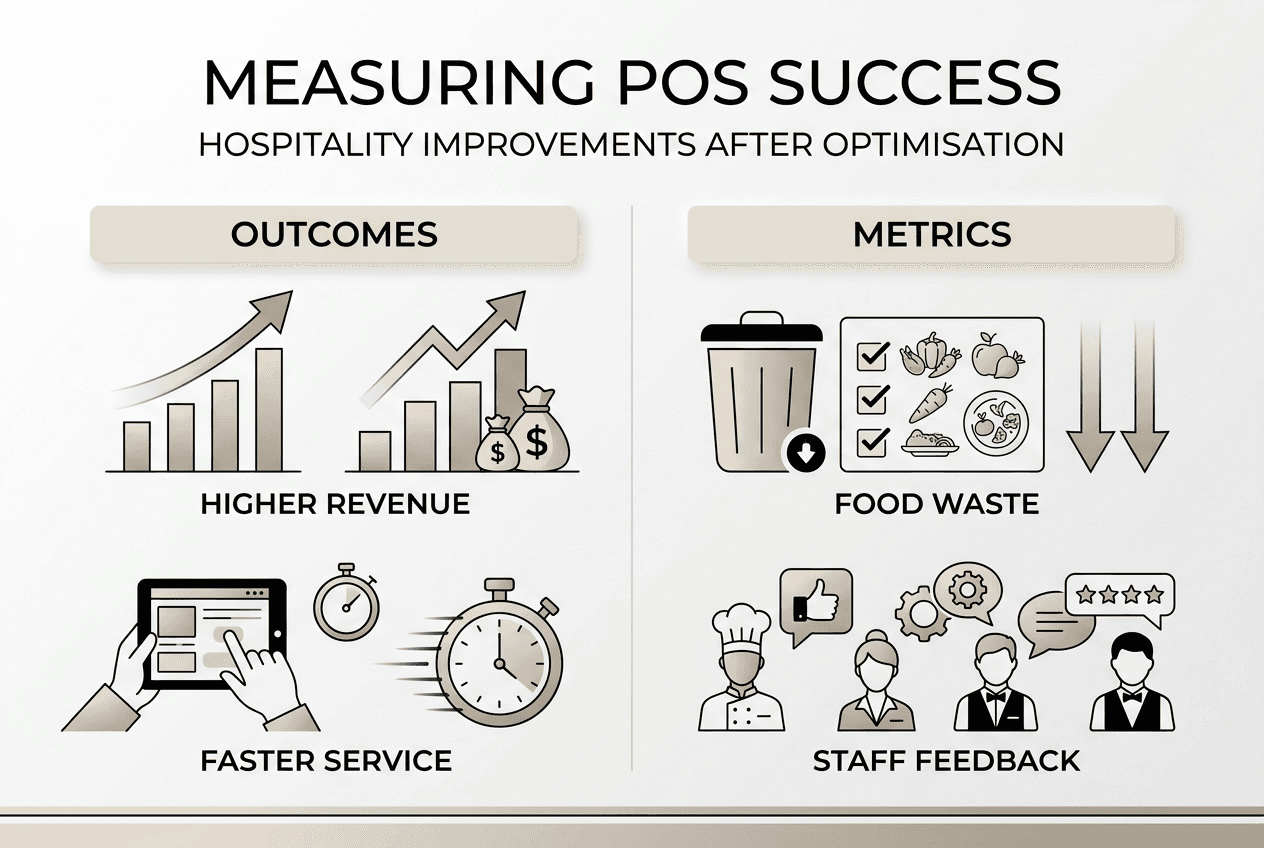
Food waste reduction provides another critical success metric. Use your POS real-time data to compare waste levels before and after optimisation. Analyse which menu items consistently over-produce and adjust preparation quantities accordingly. Track how accurately sales forecasting aligns with actual demand, refining your ordering processes to minimise excess inventory whilst avoiding stockouts.
| Success metric | Measurement method | Target improvement |
|---|---|---|
| Revenue per cover | Compare monthly averages | 10-15% increase |
| Service speed | Time from order to payment | 30-40% reduction |
| Order accuracy | Error rate per 100 transactions | Below 2% |
| Positive reviews | Mentions of service quality | 20-25% increase |
| Food waste | Cost of discarded inventory | 15-20% reduction |
| Staff satisfaction | Regular feedback surveys | Measurable improvement |
Solicit staff feedback systematically rather than waiting for complaints. Schedule brief weekly check-ins during the first month, then monthly thereafter. Ask specific questions about which features help most, where workflows still feel clunky, and what additional training would prove valuable. Your front-line team spots usability issues and efficiency opportunities that managers miss.
Pro Tip: Create a simple feedback form accessible on every terminal where staff can report issues or suggest improvements in real-time, ensuring problems get captured whilst fresh rather than forgotten during busy service.
Schedule periodic system updates and retraining to maintain performance gains. Software updates often include valuable new features, security patches, and performance improvements. Plan updates during quiet periods with adequate testing beforehand. Conduct refresher training quarterly to reinforce best practices and introduce new capabilities. As staff turnover occurs, ensure comprehensive onboarding for new employees rather than relying on peer training alone.
Continuous improvement requires analysing the data your optimised POS generates. Review sales reports to identify trending items, slow periods, and opportunities for promotions. Monitor payment method preferences to ensure you support what guests want. Track table turnover rates to optimise seating strategies. Use customer frequency data to inform loyalty programmes and targeted marketing.
“The most successful hospitality businesses treat their POS as a strategic asset that generates actionable insights, not just a tool for processing payments.”
Regular performance reviews keep your hospitality POS performance metrics aligned with business goals. Set quarterly targets for key indicators and adjust strategies when results fall short. Celebrate achievements with your team when targets are exceeded. Consider how evolving guest expectations and industry trends might require system enhancements or additional training.
Explore YCR’s hospitality POS solutions for 2026
Transforming your hospitality POS system from a source of frustration into a competitive advantage requires the right technology partner. YCR Distribution brings over three decades of UK hospitality expertise to help you select, implement, and optimise POS solutions tailored to your specific venue needs.

Our comprehensive range includes hospitality POS hardware from trusted brands like SAM4S and iMin, designed specifically for demanding restaurant and pub environments. We offer complete systems combining terminals, peripherals, and POS software solutions including SAMTOUCH and EZEEPOS that address the operational challenges discussed throughout this guide. With next-day delivery, same-day dispatch, and expert support, we help UK hospitality businesses implement optimised POS systems that boost efficiency and enhance guest experiences.
FAQ
What is the best POS system for a small UK pub?
User-friendly, cloud-based systems with offline mode capability suit small pubs best, providing flexibility without excessive complexity. Look for solutions offering loyalty integration, multiple payment options, and straightforward inventory tracking that match pub-specific needs. POS systems for small pubs and cafes should prioritise ease of use and reliability over enterprise features you will never utilise.
How can POS optimisation reduce food waste?
Real-time sales tracking and data analytics help minimise food waste by aligning orders with actual demand patterns. Your POS provides accurate forecasting based on historical data, informing purchasing decisions and prep quantities. This visibility prevents over-ordering whilst ensuring you stock enough of popular items, directly reducing waste costs.
What training do staff need for new POS systems?
Effective staff training focuses on usability and error handling to maximise POS benefits from day one. Hands-on sessions covering all features, scenario-based practice for common issues, and compliance requirements ensure proficiency. Regular refreshers maintain skills and introduce new capabilities, with staff POS training tips emphasising practical application over theoretical knowledge.
How long does POS optimisation take to show results?
Most hospitality venues see measurable improvements within two to four weeks of full deployment. Service speed gains appear first as staff master efficient workflows, followed by revenue increases as faster table turnover and reduced errors compound. Guest satisfaction improvements typically show in reviews within six to eight weeks as word spreads about enhanced service quality.
Should I choose a POS with integrated payment processing?
Integrated payment processing simplifies operations and often reduces transaction costs compared to separate systems. Single-vendor accountability eliminates finger-pointing when issues arise, whilst seamless data flow improves reporting accuracy. However, evaluate total costs carefully as some integrated solutions charge higher processing fees that offset convenience benefits over time.
Recommended
- Hospitality POS tips 2026: optimise efficiency 30% more
- Optimize Hospitality POS: Cut Transaction Times 30% & Errors 40%
- Hospitality POS Terminology – Enhancing UK Service Efficiency
- Hospitality POS 2026: 40% Fewer Breaches, Major Efficiency Gains
- Optimize your restaurant reservation workflow in 2026